How to Download Music from YouTube (Free MP3)
How to download music from YouTube as MP3: paste the link, pick MP3 320 kbps and save. Steps with screenshots for PC, Android and USB, plus the legal ways.
 Simone MatthewContent & video creator at Tube Snip·Updated · 7 min read
How to download music from YouTube: copy the video link, paste it into a YouTube to MP3 converter like Tube Snip, pick MP3 320 kbps and click Download MP3. The song saves as a normal MP3 that plays on any computer, phone, car stereo or USB stick. Only do this with music you're allowed to keep: your own tracks, Creative Commons music, or free music from the YouTube Audio Library.
If you pay for YouTube Music Premium, you can also download songs inside the YouTube Music app, but they stay in the app and aren't MP3 files. Below are the steps with screenshots, which format to pick, how it works on a computer, Android and a USB drive, and where to find music that's free to download.
Three ways to download music from YouTube
| Method | You get an MP3 file | Works on | Cost |
|---|---|---|---|
| YouTube to MP3 converter (this guide) | Yes | Any browser: Windows, Mac, Android, iPhone | Free |
| YouTube Music Premium downloads | No: songs play only inside the YouTube Music app | YouTube Music app on phone or tablet | Paid subscription |
| YouTube Audio Library | Yes | YouTube Studio on a computer | Free, for your own videos |
YouTube Music Premium is the official way to listen offline. Downloads stay inside the app, and you need to go online at least once every 30 days to keep them. YouTube Premium Lite doesn't include it.
The YouTube Audio Library is where YouTube offers free music to download as MP3, mainly for creators to use in their videos. Some tracks need credit to the artist; the library shows which.
A converter is the way to get an actual MP3 from a video you're allowed to save.
How to download music from YouTube, step by step
Copy the YouTube link of the song
Open the song on YouTube. On a computer, click the address bar and copy the link (Ctrl + C on Windows, Cmd + C on Mac). On a phone, tap Share under the video, then Copy link.
Paste the link into the YouTube to MP3 converter
Open the Tube Snip YouTube to MP3 converter. Paste the link into the box and click Fetch video. "Video link detected" appears as soon as the link is valid. No sign-up is needed.

Check the song, then pick MP3 320 kbps
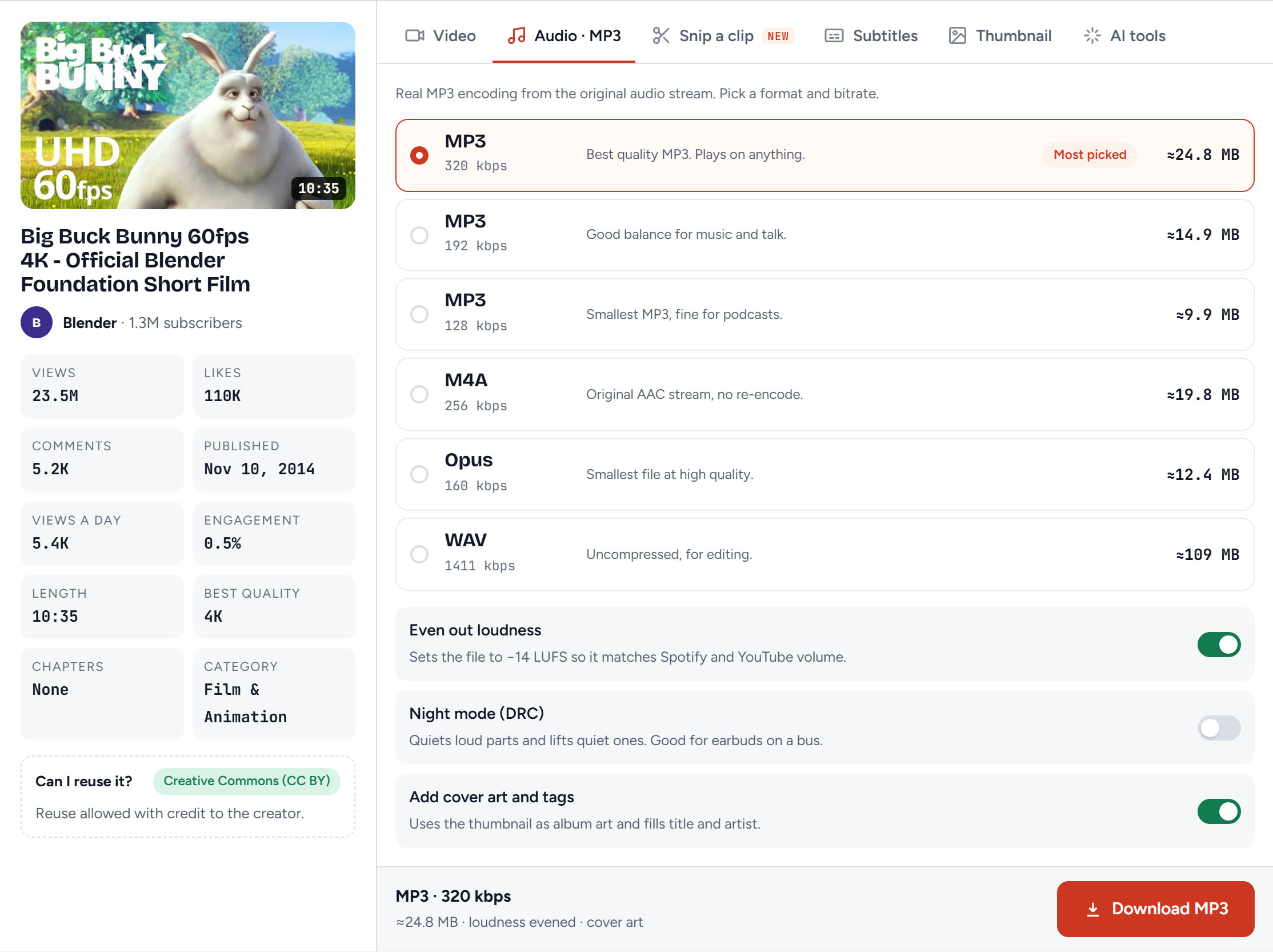
The left side shows the title, channel, length and licence, so you can check it's the right track. Our test video showed 10:35 and Creative Commons (CC BY): reuse is allowed with credit to the creator.
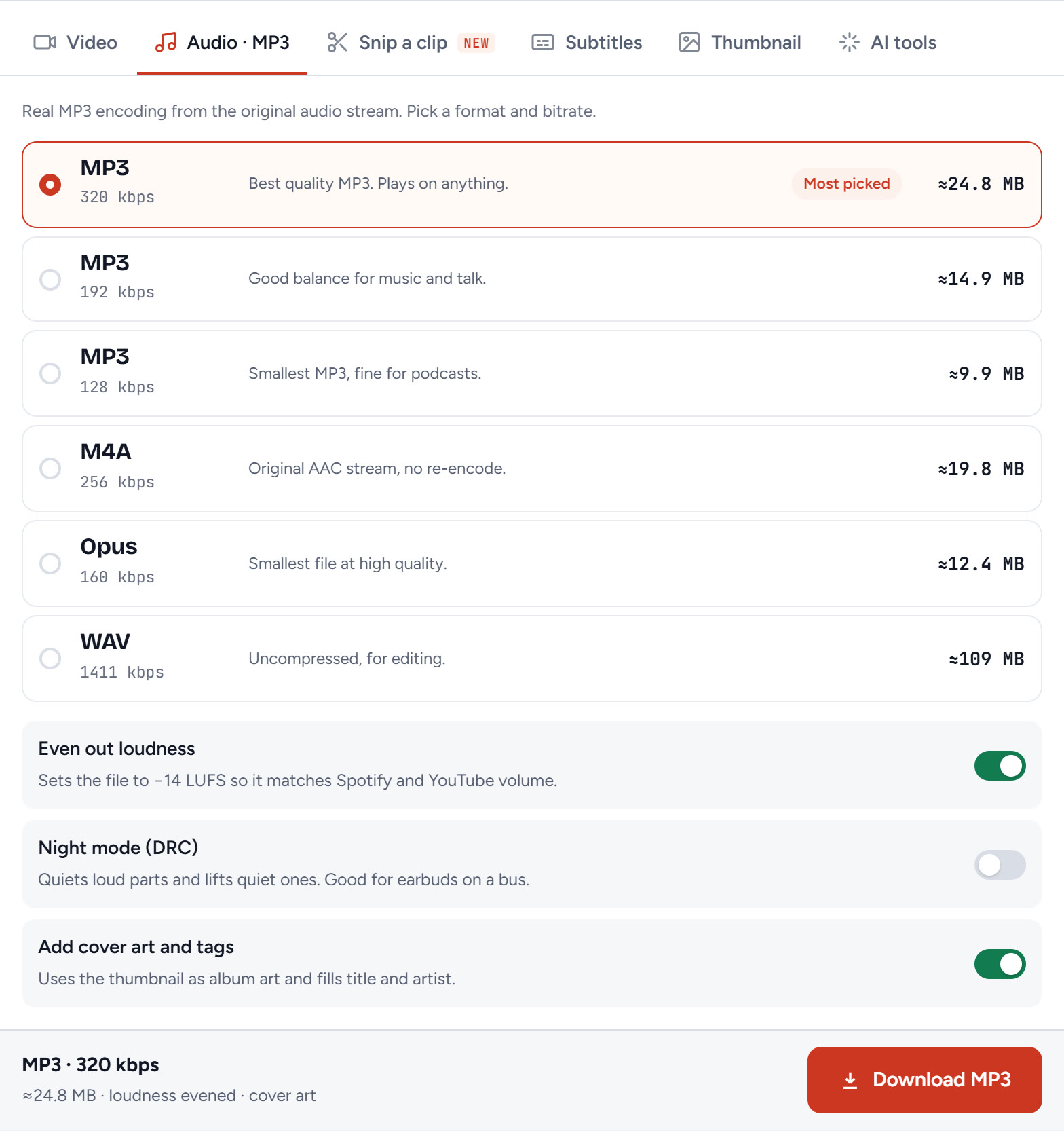
On the right, the Audio · MP3 tab lists the formats with the size each one will take. For music, keep MP3 320 kbps, the highest MP3 quality.
Choose loudness and cover art
Under the formats there are three switches:
- Even out loudness: sets the song to −14 LUFS, the level Spotify and YouTube play at, so it isn't quieter or louder than the rest of your playlist.
- Night mode (DRC): makes quiet parts louder and loud parts quieter. Handy for earbuds on a bus, but leave it off for music you want to sound as recorded.
- Add cover art and tags: puts the video thumbnail in as album art and fills in the title and artist, so the song shows up properly in your music app.
Click Download MP3
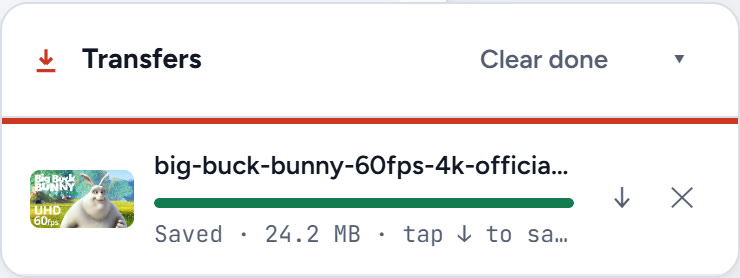
Click Download MP3. The Transfers box shows the progress, and the browser saves the MP3 to your Downloads folder. When it says Saved, you're done.
Which format should I pick for music?
| Format | Best for | Size for a 4-minute song (about) |
|---|---|---|
| MP3 320 kbps | Music: plays on everything, best MP3 quality | 9.4 MB |
| MP3 192 kbps | Lots of songs on a small phone or USB stick | 5.6 MB |
| MP3 128 kbps | Podcasts and talk | 3.8 MB |
| M4A 256 kbps | iPhone, Apple Music and iTunes | 7.5 MB |
| WAV | Editing in a music or video program | 41 MB |
YouTube's own sound isn't stored at 320 kbps, so a 320 kbps MP3 won't sound better than the video itself. It keeps as much of the original as MP3 can, which is why we pick it for music.
How to download music from YouTube to your computer
On a Windows PC or laptop, the steps above work the same in Chrome, Edge or Firefox; no software is needed. The MP3 goes to This PC → Downloads. To find it fast in Chrome or Edge, press Ctrl + J to open the download list. Double-click the MP3 to play it in Media Player, or drag it into your music folder.
On a Mac, the MP3 lands in Downloads and plays in the Music app and QuickTime. Our guide to downloading YouTube videos on Mac covers Safari's download settings if nothing happens when you click.
How to download music from YouTube to your phone
Android: open the YouTube app, tap Share → Copy link, then open the converter in Chrome, paste the link and tap Download MP3. The song saves to the Download folder. Open it from the Files app, or from any music player that scans your phone.
iPhone: Safari saves the MP3 to the Files app, in Downloads. Our iPhone guide walks through Safari downloads and the Files app step by step.
How to download music from YouTube to a USB flash drive
- Download the MP3s to your computer with the steps above.
- Plug in the USB stick and open it in File Explorer (Windows) or Finder (Mac).
- Drag the MP3s from Downloads onto the stick.
For a car stereo, pick MP3 rather than M4A or Opus: almost every car plays MP3. Many older car stereos only read sticks formatted as FAT32, so if yours shows "no files", check the stick's format first.
How to download music from YouTube Music
In the YouTube Music app, with YouTube Music Premium or YouTube Premium, tap the download arrow on a song, album or playlist. The songs then play offline inside the app. They aren't MP3 files: you can't copy them to a USB stick or open them in another player, and they need you to go online at least once every 30 days.
If you don't have Premium, the app has no download button. Music the creator offers freely, or music you have permission to keep, can be saved as MP3 with the steps above.
Where to download free music from YouTube legally
- YouTube Audio Library: this is how to download royalty free music from YouTube. In YouTube Studio, open Audio Library. Every track can be downloaded as MP3. Check the licence column: some need you to credit the artist in your video description.
- Creative Commons videos: in YouTube search, open Filters and pick Creative Commons. These can be reused with credit to the creator.
- Your own music: if you uploaded the song, you can download it back.
Troubleshooting: when the music download doesn't work
| What you see | Why | Fix |
|---|---|---|
| "This video is private or unavailable" | The video is private, removed or age-restricted | Check the link opens in a private window without signing in |
| The song has no cover or title in your music app | "Add cover art and tags" was off | Download again with the switch on |
| The MP3 is much quieter than your other songs | Loudness wasn't evened | Switch on "Even out loudness" and download again |
| The car stereo doesn't see the files | The stick isn't FAT32, or the files are M4A | Use MP3, and format the stick as FAT32 |
| "You reached the downloads limit this hour" | Free downloads have an hourly limit | Wait an hour, or sign in for higher limits |
| Can't find the song on Android | It's in the Download folder, not Music | Open Files → Downloads, or move it to Music |
Is it legal to download music from YouTube?
YouTube's terms say you shouldn't download content unless YouTube shows a download button or link, or the owner gives permission. For music, that means:
- Your own songs: fine.
- Creative Commons music: fine, with credit to the creator.
- YouTube Audio Library tracks: fine, following each track's licence.
- Chart songs and other artists' music: use YouTube Music Premium or buy the song. Don't save it as an MP3 or share it.
What we'd do
For a song you're allowed to keep, a converter is the quickest way to a real MP3: paste the link, keep MP3 320 kbps with loudness evened and cover art on, and click download. For the latest hits you listen to every day, YouTube Music Premium is the legal route, even though the songs stay inside the app.
Questions
Can you download music from YouTube?
Yes, for music you're allowed to keep: your own songs, Creative Commons music and YouTube Audio Library tracks. Paste the link into a YouTube to MP3 converter, pick MP3 320 kbps and download. For other music, use YouTube Music Premium.
How do I download music from YouTube to my computer?
Copy the video link, paste it into Tube Snip's YouTube to MP3 converter in Chrome, Edge, Firefox or Safari, pick MP3 320 kbps and click Download MP3. The MP3 goes to your Downloads folder. No software is needed.
Are YouTube Music Premium downloads MP3 files?
No. Premium downloads play only inside the YouTube Music app, and you need to go online at least once every 30 days to keep them. You can't copy them to a USB stick or another player.
What is the best format to download music from YouTube?
MP3 320 kbps for music that plays everywhere, M4A for Apple devices, and WAV if you'll edit the sound. YouTube's own sound isn't 320 kbps, so 320 keeps as much of it as MP3 can.
Where can I download free music from YouTube legally?
The YouTube Audio Library in YouTube Studio offers free MP3 downloads; some tracks need credit to the artist. Creative Commons videos, found with the Creative Commons search filter, can also be reused with credit.