How to Download YouTube Videos on Mac, No App
How to download YouTube videos on Mac with no app: paste the link in Safari, pick MP4 and quality, and save it to Downloads. 6 steps with real screenshots.
 Simone MatthewContent & video creator at Tube Snip·Updated · 6 min read
How to download YouTube videos on Mac without installing anything: copy the video link, paste it into a web downloader in Safari, pick MP4 at the quality you want, and click Download. The file lands in your Downloads folder and plays in QuickTime. In our test, a 10-minute video saved as a 720p MP4 in 30 seconds.
Below are the exact steps with screenshots, which quality to pick on a MacBook, what to do when Safari won't save the file, and the two official alternatives: YouTube Premium (which doesn't work in Safari) and the Mac's built-in screen recorder.
Before you start: three ways to save YouTube videos on a Mac
| Method | Works in Safari | You get a real video file | Cost |
|---|---|---|---|
| Web downloader (this guide) | Yes | Yes, an MP4 in Downloads | Free |
| YouTube Premium downloads | No: Chrome, Edge, Firefox or Opera only | No, it plays inside YouTube only | Paid subscription |
| Screen recording (Cmd + Shift + 5) | Yes | Yes, but you must play the whole video | Free |
YouTube Premium is the official way to watch offline, but on a computer it only works in Chrome, Edge, Firefox and Opera, and the video stays inside YouTube. You can play it offline for up to 29 days, then you need to reconnect. Screen recording works anywhere, but a 20-minute video takes 20 minutes to record.
A web downloader is the fastest way to get an actual file you can open in QuickTime, put in iMovie or copy to a USB stick. Use it for videos you made, Creative Commons videos, or videos you have permission to save.
How to download YouTube videos on Mac, step by step
Copy the YouTube video link
Open the video on YouTube in Safari (or Chrome). Click the address bar and press Cmd + C, or click Share under the video and choose Copy.
Tip: if you want the video to start at a moment, YouTube's Share box has a "Start at" option. The downloader still saves the whole video unless you cut a clip.
Paste the link into Tube Snip and click Fetch video
Open the Tube Snip YouTube video downloader in a new tab. Click the box at the top, press Cmd + V and click Fetch video. "Video link detected" appears as soon as the link is valid.
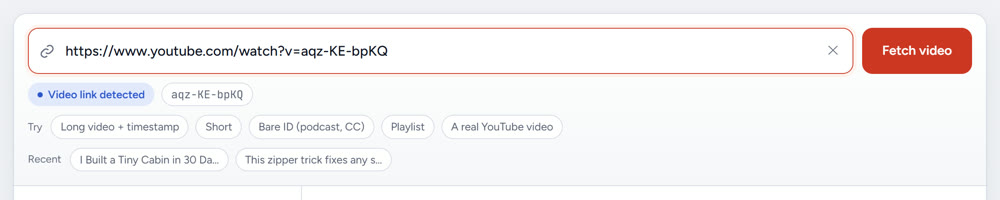
Check that it found the right video
The left side shows the title, channel, length and licence. Check the title and length before you download. Our test video showed 10:35 and Creative Commons (CC BY), which means reuse is allowed with credit.
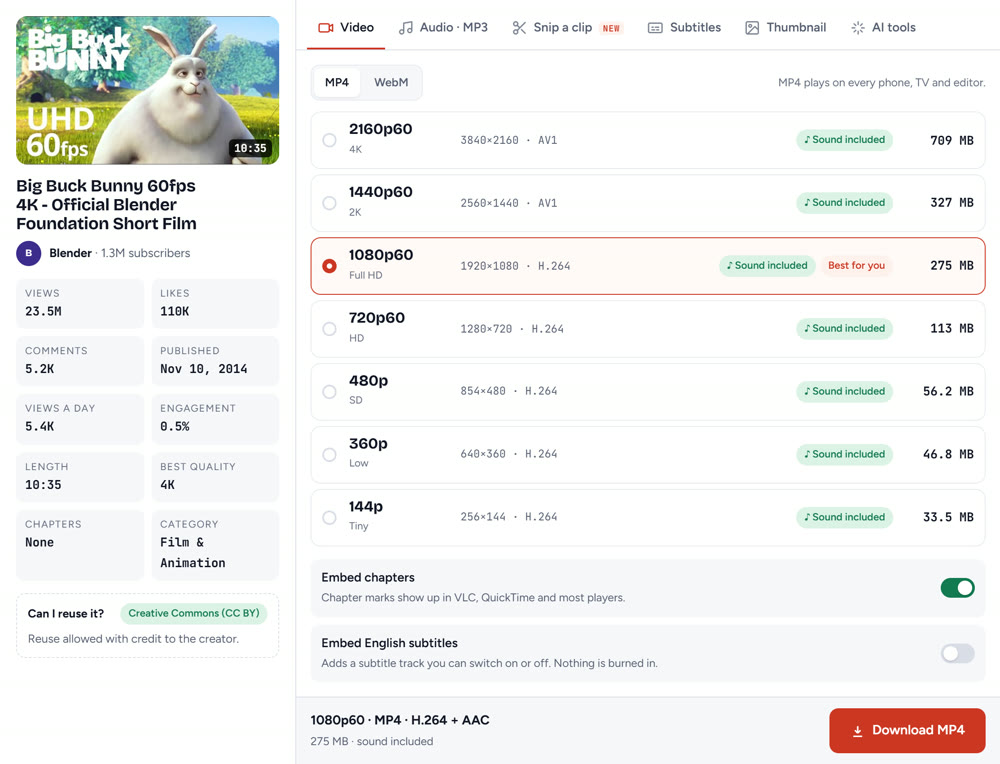
Pick MP4 and a quality that suits your Mac
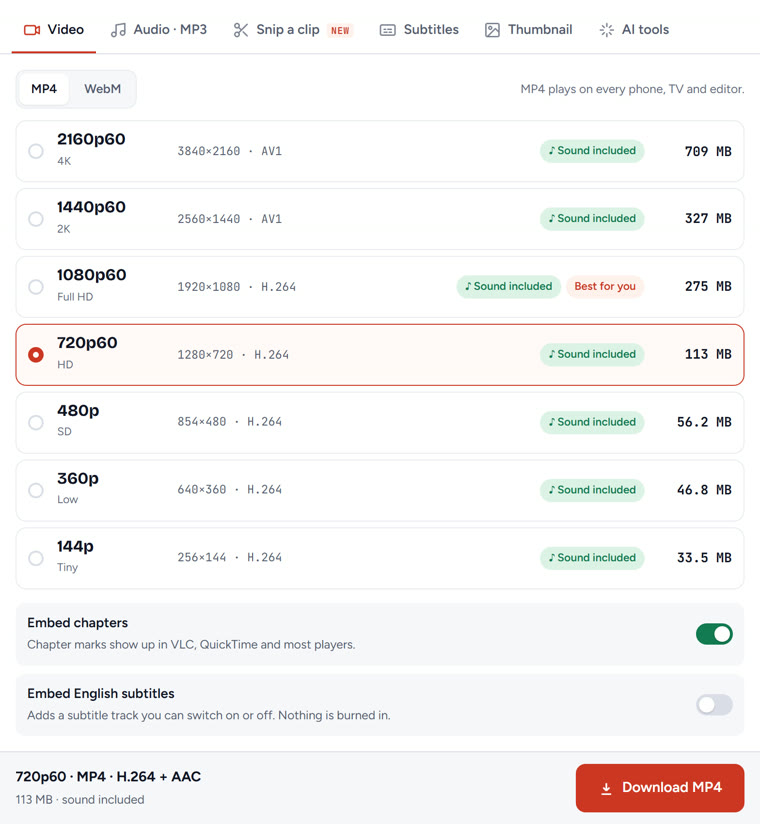
Keep MP4: it opens in QuickTime, Photos, iMovie and Final Cut. Then pick a quality:
- 1080p (Full HD): the best choice for most MacBooks. It uses H.264, which every Mac plays smoothly.
- 720p: half the size, still sharp on a laptop screen.
- 4K and 2K: on Tube Snip these are AV1 files. Newer Macs handle AV1, but older Macs and QuickTime may struggle. If 4K stutters, play it in VLC or pick 1080p instead.
Every row shows "Sound included", so you never get a silent file.
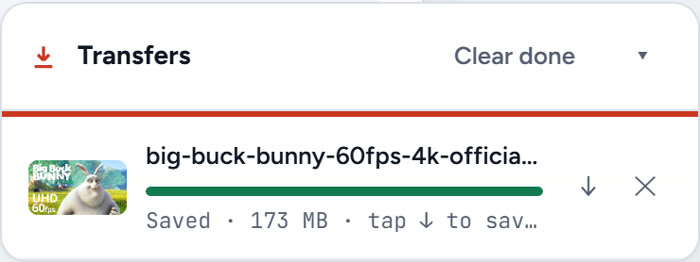
Click Download MP4 and let Safari save it
Click Download MP4. The Transfers box shows progress. When it says Saved, the file is ready. Safari may ask "Do you want to allow downloads on tubesnip.com?" the first time: click Allow.
Find the video in Downloads and open it
Click the Show Downloads button (the arrow near the top-right of Safari) to see the file. Downloads usually go to your Downloads folder. To choose another folder, go to Safari → Settings → General → File download location.
Double-click the MP4 to open it in QuickTime Player. To keep it with your photos, drag it into the Photos app; it will sync to your iPhone through iCloud Photos if that's turned on.
How much space does a YouTube video take on a Mac?
From the sizes Tube Snip showed for our 10:35 test video, plus the real 720p file:
| Quality | Codec | Size for 10:35 | Per minute (about) |
|---|---|---|---|
| 4K (2160p60) | AV1 | 709 MB | 67 MB |
| 1080p60 | H.264 | 275 MB | 26 MB |
| 720p60 | H.264 | 173 MB (real file) | 16 MB |
| 480p | H.264 | 56 MB | 5 MB |
Animated and 60 fps videos come out larger than talking-head videos at the same quality, so treat these as rough numbers.
Download only the audio on Mac
Want the sound without the picture, for a podcast, lecture or song you have rights to? In the same box, switch to the Audio · MP3 tab instead of Video, or use our YouTube to MP3 converter directly. The MP3 opens in the Music app and in QuickTime.
Download just one part of the video
If you only need a scene, use the Snip a clip tab or the YouTube clip cutter: set the start and end, keep "Original" for a normal 16:9 MP4, and save only that part. It's faster than downloading the whole video and trimming it in QuickTime.
Does it matter if my MacBook has an Apple chip or an Intel chip?
Not for this method. The downloading happens in the browser, so it works the same on MacBook Air, MacBook Pro, iMac and Mac mini, with Apple silicon or Intel. The only difference is playback of 4K AV1 files, which is easier on newer Macs.
Troubleshooting: when the download doesn't work
| What you see | Why | Fix |
|---|---|---|
| "This video is private or unavailable" | The video is private, removed or age-restricted | Check that the link opens in a private Safari window without signing in |
| Nothing happens after clicking Download | Safari is blocking downloads from the site | Safari → Settings → Websites → Downloads, set tubesnip.com to Allow |
| The 4K file stutters or won't play in QuickTime | 4K and 2K are AV1 files | Play it in VLC, or download 1080p (H.264) instead |
| "You reached the downloads limit this hour" | Free downloads have an hourly limit | Wait an hour, or sign in for higher limits |
| The file plays without sound | Rare with Tube Snip: every row includes sound | Download again and check the row says "Sound included" |
| You can't find the file | Safari saved it to a different folder | Click Show Downloads in Safari, then the magnifying glass next to the file |
Is it legal to download YouTube videos on a Mac?
YouTube's terms say you shouldn't download content unless YouTube shows a download button or link, or you have permission. In practice:
- Your own videos: fine. You can also download them from YouTube Studio.
- Creative Commons videos: fine, with credit to the creator.
- Other people's videos: ask first, and never re-upload them as your own.
- For offline watching of anything else: YouTube Premium is the official route (in Chrome, Edge, Firefox or Opera).
What we'd do
For a quick copy of a video you're allowed to save, the web method in Safari is the simplest: no app, no account, a real MP4 in about half a minute. Pick 1080p for the best balance on a MacBook, and keep an eye on space if you save a lot of 60 fps videos.
Questions
Can I download YouTube videos on Mac without an app?
Yes. Copy the link, open a web downloader like Tube Snip in Safari, keep MP4, pick a quality and click Download. The MP4 lands in your Downloads folder and plays in QuickTime.
Do YouTube Premium downloads work in Safari on Mac?
No. On a computer, YouTube Premium downloads work in Chrome, Edge, Firefox and Opera. They stay inside YouTube, not as files, and play offline for up to 29 days before you need to reconnect.
Where do downloaded YouTube videos go on a Mac?
Usually your Downloads folder. Click Show Downloads near the top-right of Safari to see the file, or change the folder in Safari → Settings → General → File download location.
Why won't my 4K YouTube download play in QuickTime?
4K and 2K downloads are often AV1 files, which older Macs and QuickTime may not play smoothly. Open them in VLC, or download 1080p, which uses H.264 and plays everywhere.
Is it legal to download YouTube videos on a Mac?
YouTube's terms only allow downloads where YouTube shows a download option or you have permission. Your own videos and Creative Commons videos are fine; for anything else, ask the creator or use YouTube Premium.