How to Add Your Own Sound to TikTok (3 Ways, 2026)
How to add your own sound to TikTok: record it, add a voiceover, or upload a video with your audio so it becomes your original sound. Tested steps.
 Simone MatthewContent & video creator at Tube Snip· · 5 min read
Here is how to add your own sound to TikTok: put it in the video you post. Record with sound in the TikTok camera, add a voiceover in the editor (Voice → Record), or upload a video that already has your sound in it. Once you post, the audio becomes your original sound, and other people can use it in their videos. TikTok's sound picker only shows TikTok's library, so an audio file you made (a song, a beat, a podcast clip) has to go into a video first.
This guide covers all three ways, how to trim and balance the sound, and what to do if TikTok removes it. We tested the "sound file" route on October 23, 2026 with a 15-second clip.
Three ways to make a sound on TikTok
| Your sound is... | Best way | Where in TikTok |
|---|---|---|
| Your voice, live | Record with sound | Add post + → record |
| Your voice over a clip | Voiceover | Edit → Voice → Record |
| A file you made (song, beat, clip of your own video) | Put it in a video, then upload | Add post + → Upload |
To create a sound on TikTok, any of the three works. All three end the same way: the sound posts with your video, and TikTok keeps it as an original sound. If you only want to pick a song from TikTok's library, that's a different job: tap Add sound at the top of the recording screen and search.
How to add a custom sound to TikTok from a file, step by step
Pick the part of your sound
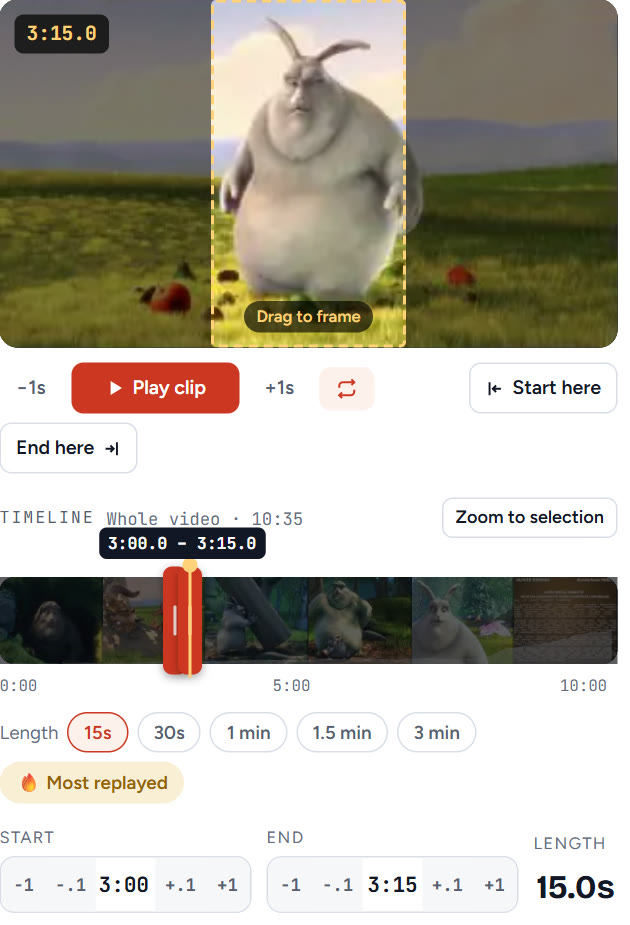
Decide which part people should hear. Short and clear works best: a hook, a line, a beat drop. If the sound is in one of your YouTube videos, open the YouTube clip cutter, paste the link and set the start and end. We picked 3:00 to 3:15, a 15-second part.
Save it as a 9:16 TikTok video
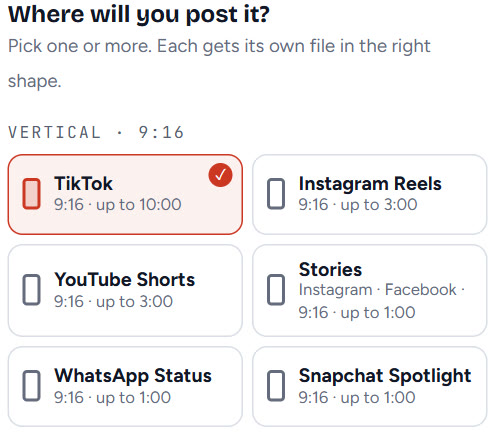
Under Where will you post it?, tick TikTok (9:16, up to 10:00) and save the clip. The sound stays inside the video file, which is exactly what TikTok needs. If your sound is an audio-only file, put it over any vertical video or still image in a phone editor first, then save that as a video.
Check the file has sound
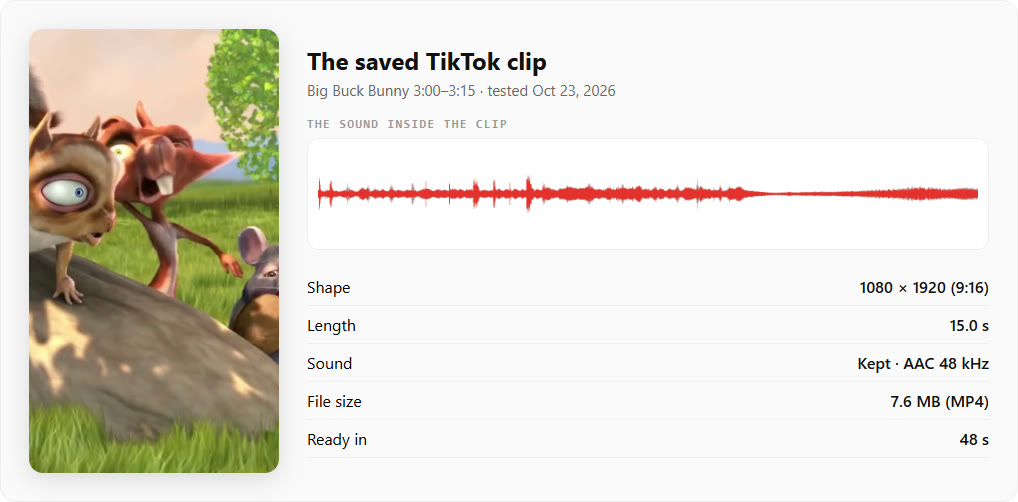
Play the clip once before you upload it. No sound in the file means no sound on TikTok.
Upload it to TikTok
- In the TikTok app, tap Add post + at the bottom.
- Tap Upload and pick your clip.
- Tap Next, then Edit on the side panel if you want to open the editor.
Don't add music from the library in this step. TikTok Help says that when you change the music, all previous background music and voices are replaced. That includes the sound you just brought in.
Post it and find your original sound
Add a caption and post. Your audio now has its own sound page. To open it, tap the sound name at the bottom of your video. From that page you can share it or reuse it in a new post.
How to add a voiceover on TikTok
A voiceover is the fastest way to add your own voice to a clip you already have. From TikTok Help:
- From the editing screen, tap Voice on the side panel.
- Tap Record at the bottom.
- Tap the Record button and speak.
- Tap Done to save the voiceover.
- Pick a voice effect if you want one.
- Tap Save at the top.
Add the voiceover after any music. Changing the music later replaces the voices too.
How to trim a sound on TikTok
- Pick the sound for your post.
- Tap Trim next to it.
- Drag the slider to the point where the sound should start.
- Tap the Confirm ✓ button.
Preview the post after trimming and adjust again if it starts in the wrong place. Trimming only moves the start. To make a sound longer on TikTok, cut a longer part before you upload: the clip cutter's TikTok option goes up to 10 minutes.
Can you add more than one sound on TikTok?
One sound per post. TikTok Help says so directly. So how do you add another sound on TikTok? You can still layer sound effects (Sound → Sound effect) and a voiceover on top. If you need two songs or a song and a long recording, mix them into one audio track before you upload.
Can you upload a sound to TikTok without a video?
Not from what we found. TikTok's sound picker shows For You, Favourites, Recent and search results from TikTok's library. We found no option in TikTok Help to import a bare audio file. A sound is born from a post, so the route is always: put your audio in a video, then post it.
Using your own music on a Business account
TikTok Help says Business accounts can't use music that isn't licensed for commercial use. That rule is about TikTok's library. Your own recordings and music you made are yours to use. Before posting a song you wrote with others, check that everyone agrees.
Why did TikTok remove my sound?
TikTok removes sounds it finds breaking intellectual property rules or Community Guidelines. When that happens, every video using the sound is muted and you get a notice.
| Problem | What it means | Fix |
|---|---|---|
| "Sound removed" on your video | A copyright or guidelines removal | Tap the notice, then Appeal or Change sound |
| Your voice is gone after adding music | Changing music replaces earlier voices | Add music first, then the voiceover |
| No sound after uploading | The file had no audio | Play the file before uploading; save it again with sound |
| Your song can't be added on a Business account | The library song isn't licensed for commercial use | Use your own audio or a commercial-use sound |
| The sound starts in the wrong place | It hasn't been trimmed | Tap Trim and drag the start |
How to remove your original sound from TikTok
- Tap the sound at the bottom of your video to open its page.
- Tap the Share button at the top.
- Tap Remove sound, then Remove, and confirm.
This removes it from every video that uses it, yours included, and TikTok tells the other creators. Want a copy first? Save it from your post with TikTok to MP3.
What we'd do
Keep your sound short and clear, put it in a 9:16 video, and post it as is. Add voiceovers after music, never before. Use only audio you made or have the rights to. If you're planning the clip length, see how long a TikTok can be.
Questions
How do I add my own sound to TikTok?
Put it in the video you post: record with sound, add a voiceover (Edit → Voice → Record), or upload a video that already has your audio. After you post, it becomes your original sound.
Can I upload an audio file to TikTok as a sound?
We found no option for that in TikTok Help: the sound picker shows TikTok's library. Put the audio in a 9:16 video first, then upload and post that video.
Can you add more than one sound on TikTok?
One sound per post, according to TikTok Help. You can still add sound effects and a voiceover on top, or mix two tracks into one before uploading.
Why did my voice disappear when I added music?
TikTok Help says changing the music replaces all previous background music and voices. Add the music first, then record the voiceover.
How do I remove my original sound from TikTok?
Tap the sound at the bottom of your video, tap Share, then Remove sound and confirm. It is removed from every video that uses it, including yours.