How to Post a YouTube Video on Instagram (Reel, Story, Link)
How to post a YouTube video on Instagram: share the link with a Story Link sticker, or cut a 9:16 clip and post it as a Reel. Steps, sizes and a real test.
 Simone MatthewContent & video creator at Tube Snip· · 6 min read
How to post a YouTube video on Instagram: Instagram doesn't play YouTube links, so you have two options. Share the link in a Story with the Link sticker, so people tap through to YouTube. Or post a clip: cut the best 15–60 seconds into a vertical 9:16 video and upload it as a Reel or Story. The second one gets far more views on Instagram, and it's how most creators promote their own YouTube videos.
Below are both methods step by step, with screenshots from our own test, the sizes and lengths Instagram wants, and what to do with the link so viewers can find the full video.
Two ways to share a YouTube video on Instagram
| Link in a Story | Clip as a Reel or Story | |
|---|---|---|
| What people see | Your Story with a tappable link | The video itself, playing in Instagram |
| Plays inside Instagram | No: the link opens YouTube | Yes |
| Can reach non-followers | No | Yes, as a Reel |
| Works for | Any public YouTube video | Your own videos, or ones you have permission to use |
| Time needed | 1 minute | A few minutes |
Use the link to point followers at any video, including someone else's. Use a clip to promote your own YouTube video to people who don't follow you yet.
Method 1: Share a YouTube link in an Instagram Story
Instagram's Link sticker is available to everyone. Instagram announced this on October 27, 2021; before that, only big accounts could add links to Stories.
- In the YouTube app, open the video, tap Share, then Copy link.
- In Instagram, start a new Story and add a photo or a screenshot of the video (a screenshot of the thumbnail works well).
- Tap the sticker icon at the top and choose Link.
- Paste the YouTube link, tap Done, and place the sticker where people will see it.
- Share the Story.
Viewers tap the sticker and the video opens in YouTube. Instagram's help pages note that new accounts, and accounts that repeatedly share content that breaks its rules, may not get the Link sticker.
Why not paste the link in a caption? Instagram doesn't make links in post captions clickable. That's why creators write "link in bio" and add the YouTube link to their profile instead.
Method 2: Post a YouTube video clip on Instagram as a Reel
This is how to post a YouTube video on Instagram so it actually plays there. It's for your own YouTube videos, Creative Commons videos, or videos you have the owner's permission to repost.
Copy the YouTube video link
Open the video on YouTube and copy its link: Share → Copy link in the app, or the address bar on a computer.
Paste it into the YouTube clip cutter
Open the Tube Snip YouTube clip cutter, paste the link and click Fetch video. "Video link detected" appears as soon as the link is valid.

Pick the part you want to post
Set Start and End, or tap a length (15s, 30s, 1 min, 1.5 min, 3 min). Click Play clip to check it. The 🔥 Most replayed button jumps to the part YouTube viewers rewatch most, which is often a good hook.
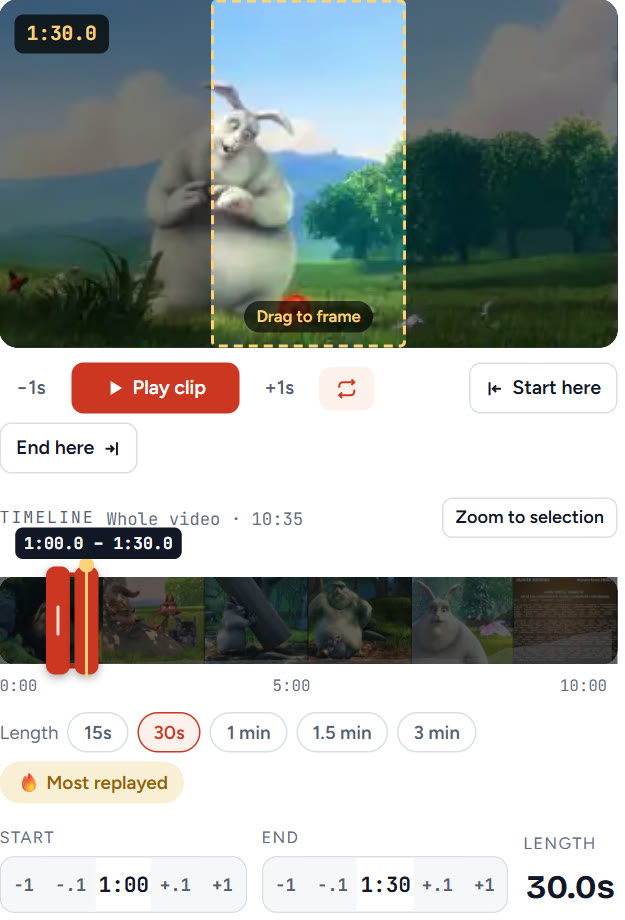
Choose Instagram Reels (and Stories)
Under Where will you post it?, tick Instagram Reels, and Stories if you want a Story version too. Keep Fill the frame so the clip fills the phone screen, then drag the box on the video to choose what stays in view.
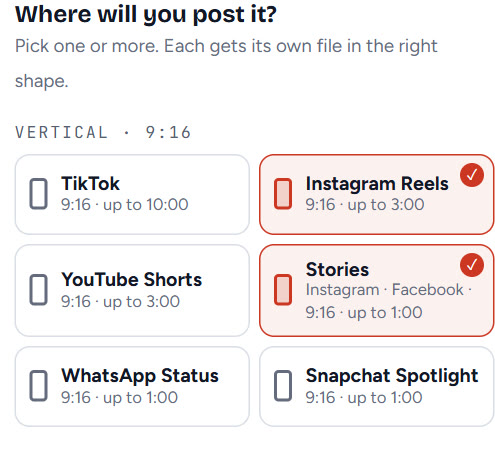
Download the clip and move it to your phone
Click Save clip (it says Save 2 clips when you picked two). Each version is saved as its own MP4. If you made it on a computer, send it to your phone with AirDrop, Google Drive, or by emailing it to yourself.
Post it in the Instagram app
In Instagram, tap +, choose Reel, pick the clip from your camera roll, add a caption and tap Share. In the caption, credit the source and tell people where the full video is: "Full video on YouTube, link in bio." Then share the Reel to your Story and add a Link sticker pointing to the YouTube video.
What size and length does Instagram want?
| Where | Shape | Length | Size |
|---|---|---|---|
| Reels | 9:16 vertical | Up to 3 minutes to be recommended to non-followers | 1080 × 1920 |
| Stories | 9:16 vertical | Up to 60 seconds per Story | 1080 × 1920 |
| Feed post | 4:5 portrait | Any | 1080 × 1350 |
Instagram says Reels up to 3 minutes can be recommended to people who don't follow you. Longer Reels stay with your followers. A horizontal YouTube video posted as is shows small, with black bars; cropping to 9:16 fixes that.
How to share a YouTube Short on Instagram
A YouTube Short is already 9:16, so there's nothing to crop. Save your own Short with the YouTube Shorts downloader and post it as a Reel. Someone else's Short needs their permission first; otherwise, share its link in a Story.
Can you post a whole YouTube video on Instagram?
Usually not as one piece. A 10-minute video is too long to be recommended as a Reel, and most viewers scroll on after a few seconds anyway. The better approach is one or two strong clips, each 15–60 seconds, with "full video on YouTube, link in bio".
If you do want the full video on Instagram, download it as an MP4 with the YouTube video downloader (only your own videos or ones you have permission for) and post it from your phone; it will stay with your followers.
Troubleshooting
| What you see | Why | Fix |
|---|---|---|
| No Link sticker in Stories | New account, or the account broke Instagram's rules | Add the link to your bio instead |
| The YouTube link in the caption isn't clickable | Instagram doesn't link captions | Use "link in bio" or a Story with the Link sticker |
| The Reel has black bars | The clip is 16:9 | Cut it as 9:16 with Fill the frame |
| The Story doesn't play the whole clip | It's longer than 60 seconds | Keep Story clips to 60 seconds or less |
| The clip looks blurry | It was screen-recorded or re-saved many times | Cut it from the YouTube video directly |
| "You reached the downloads limit this hour" | Free downloads have an hourly limit | Wait an hour, or sign in for higher limits |
Is it legal to repost a YouTube video on Instagram?
Your own videos: yes. Someone else's video: only with their permission, or if it's under a Creative Commons licence that allows reuse (credit the creator). YouTube's terms don't allow downloading without permission, and Instagram can remove reposted content when the owner reports it. Sharing a link to someone else's video is always fine.
What we'd do
For your own YouTube video: cut the best 30 seconds as a 9:16 Reel, post it with "full video on YouTube, link in bio", and share it to your Story with a Link sticker to the video. For someone else's video, skip the download and share the link in a Story.
Questions
Can you post a YouTube video on Instagram?
Not as a playing YouTube link. You can share the link in a Story with the Link sticker, or post a clip of the video as a Reel or Story. Clips are only for your own videos or ones you have permission to repost.
How do I share a YouTube video on my Instagram story?
Copy the YouTube link, start a Story, tap the sticker icon, choose Link, paste the link, tap Done and place the sticker. Viewers tap it to open the video on YouTube.
Why is the YouTube link in my Instagram caption not clickable?
Instagram does not make links in post captions clickable. Put the link in your bio and write "link in bio", or share it in a Story with the Link sticker.
How long can a YouTube clip be on Instagram?
Reels up to 3 minutes can be recommended to people who do not follow you. Stories play up to 60 seconds each. For promotion, 15–60 seconds works best.
What size should a YouTube clip be for Instagram Reels?
Vertical 9:16 at 1080 × 1920. A horizontal YouTube video posted as is shows small with black bars; crop it to 9:16 first.