YouTube Shorts Length (2026): Max Time, Size and Ratio
YouTube Shorts length explained: the 3-minute limit, 9:16 at 1080×1920, square vs vertical, music and thumbnail rules, plus our real test and ideal lengths.
 Simone MatthewContent & video creator at Tube Snip· · 8 min read
YouTube Shorts length is capped at 3 minutes. Any video uploaded on or after October 15, 2024 counts as a Short when it is square or vertical and no longer than 3:00. Go one second over, or upload it wide (16:9), and YouTube treats it as a regular video instead.
That is the rule. The harder question is how long your Short should be, and what size it has to be so it fills the screen. Below you'll find the full spec sheet, what changed in 2024 and 2026, our own test numbers, and a simple length guide by goal.
How long can a YouTube Short be?
A Short can be up to 3 minutes long. YouTube raised the limit from 60 seconds to 3 minutes for videos uploaded on or after October 15, 2024. Official Artist Channels got the same rule later, for uploads from December 8, 2025.
Two things decide whether a video becomes a Short:
- Length: 3:00 or shorter.
- Shape: square (1:1) or vertical (like 9:16).
Both have to be true. A vertical video that runs 3:05 lands in your normal videos tab. A wide 16:9 clip that runs 40 seconds does too. Older uploads keep their old label: a 2-minute vertical video posted before October 15, 2024 stays a long-form video.
So when people ask how long YouTube Shorts are allowed to be, the honest answer is "up to 3 minutes, if the shape is right."
YouTube Shorts specs at a glance
| Spec | What YouTube allows | What we use |
|---|---|---|
| Maximum length | 3:00 (uploads from Oct 15, 2024) | 15–60 s for most clips |
| Minimum length | No official minimum | 10 s or more |
| Aspect ratio | Square (1:1) or vertical | 9:16 |
| Dimensions / size | Not fixed by YouTube | 1080 × 1920 px |
| Recording in the app | Up to 1080p | 1080p |
| Title | Up to 100 characters | Under 60 so it isn't cut |
| Music from the Shorts library | Most songs up to 90 s, some 60 or 30 s | Original audio when we can |
| Thumbnail | Pick a frame; custom upload for Partner Program creators | A frame with a readable face or text |
The "what we use" column is our habit, not a YouTube rule. The left column comes from YouTube's help pages, linked at the end.
YouTube Shorts aspect ratio, size and resolution
The YouTube Shorts aspect ratio that fills a phone screen is 9:16. In pixels, the standard YouTube Shorts dimensions are 1080 × 1920 (width × height). That is the size most editors export for Shorts, Reels and TikTok, and it's the size our own exports come out at.
Square 1:1 also counts as a Short. It just leaves bars above and below on a phone, so the video looks smaller in the feed. Anything wider than square, like 4:3 or 16:9, is treated as a normal video.
What about resolution? YouTube's in-app camera records Shorts at up to 1080p. You can upload a sharper file, but most people watch Shorts on a phone, where 1080 × 1920 already looks crisp. A bigger file mostly means a longer upload.
Quick answers to the size questions people search:
- What size is a YouTube Short? 1080 × 1920 px is the safe choice.
- What is the frame size or canvas size? Same thing: a 9:16 canvas, 1080 wide by 1920 tall.
- Best aspect ratio for YouTube Shorts? 9:16. Use 1:1 only if the clip must also work in a square feed.
Our test: one 59-second Short from a 10-minute video
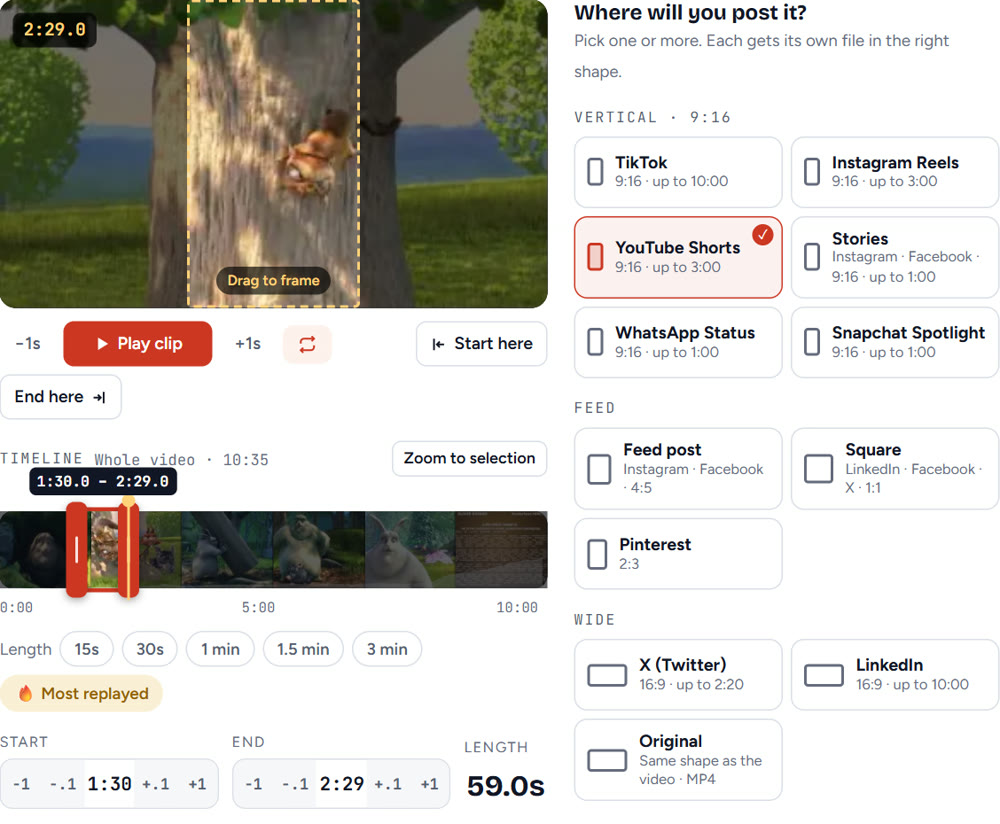
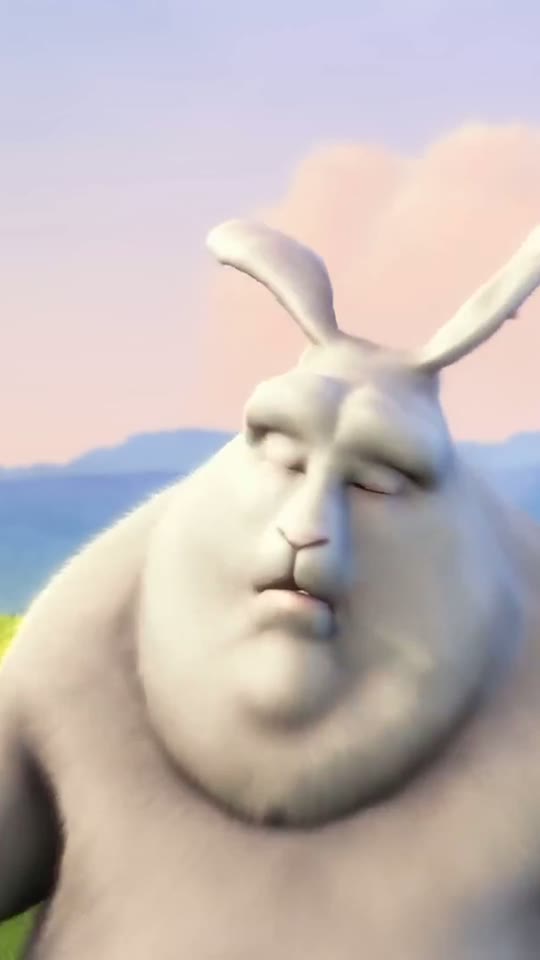
We wanted real numbers, not guesses. On October 22, 2026 we took Big Buck Bunny, the open-licence film from the Blender Foundation (10:35 long, 16:9), and turned one scene into a Short with our YouTube clip cutter.
What we did:
- Pasted the YouTube link and opened the clip editor.
- Set the start to 1:30 and the end to 2:29, so the selection was 59.0 seconds.
- Picked only YouTube Shorts as the output and left framing on "Fill the frame".
- Saved the clip.
The 9:16 box on the video decides which part of the wide picture stays in view. In a 16:9 film, a vertical crop keeps roughly a third of the width, so we dragged the box onto the squirrel in that scene before saving.
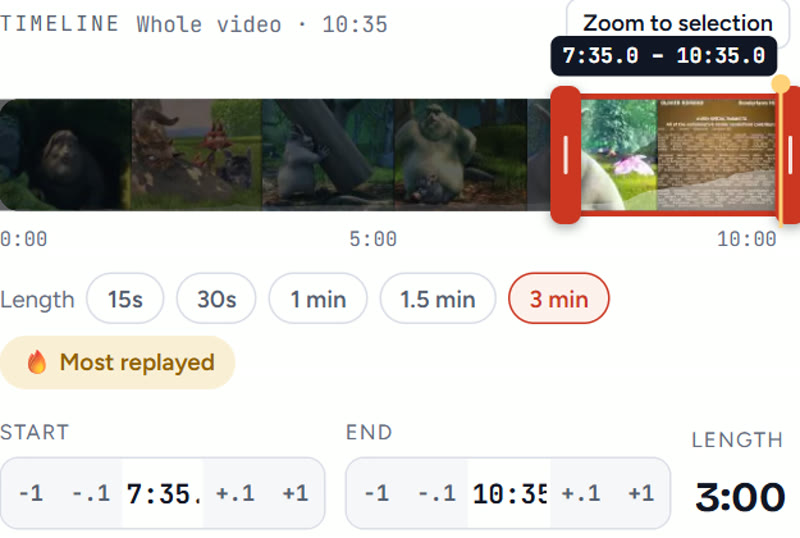
We also tried the 3 min button on the same video. It selected exactly 3:00 (7:35 to 10:35), and the editor marked the outputs with lower limits: Stories, WhatsApp Status and Snapchat Spotlight showed "Trims to 1:00", and X showed "Trims to 2:20". Shorts and Instagram Reels stayed at the full 3:00.
What our own Short taught us about length
Numbers from one test file are useful. Numbers from a real audience are better. Our channel posted a 21.3-second Short on October 16, 2026 ("YouTube's download button never saves to your gallery"). By October 22 it had 1,033 views and an average view time of 24 seconds.
Read that again: people watched more than the full length on average, about 113%. On a Short, the video loops. When a clip is short and the ending makes people want to see the start again, the replays count.
That's one Short on a small channel, so treat it as a hint, not a law. It does match what larger surveys say about short clips holding attention.
How long should YouTube Shorts be?
The maximum length of YouTube Shorts is 3 minutes, but most Shorts don't need anywhere near that. Adobe surveyed 507 creators who post Shorts (March 2026):
- 53% said Shorts under 30 seconds get the most views.
- 49% said under-30-second Shorts send the most viewers on to their long videos.
- Only 31% set a target length before filming. Half estimate roughly and let the content decide.
So what is the best length for YouTube Shorts? Here's how we pick, based on what the video has to do:
| Goal | Ideal length for YouTube Shorts | Why |
|---|---|---|
| Trend, meme, reaction | 7–15 s | Short loops rack up replays |
| One quick tip | 15–30 s | One idea, no padding |
| Story, demo, before/after | 30–60 s | Needs setup and payoff |
| Mini tutorial, podcast moment | 60 s – 3:00 | Only if every second earns its place |
Need ideas that fit these lengths? Our YouTube Shorts ideas generator suggests topics with a hook for the first two seconds.
Is there a minimum length for YouTube Shorts?
YouTube doesn't publish a minimum. Very short uploads go through, but a 3-second clip rarely gives viewers a reason to stay or come back. We aim for at least 10 seconds: enough for a hook, a point and a payoff.
What happens if your Short is over 3 minutes?
It isn't a Short anymore. A 3:01 vertical video publishes as a normal video. It won't show in the Shorts feed, and on a phone it plays in the regular player.
The fix is simple: trim it before upload. In any editor, or in our clip cutter, set the selection to 3:00 or less. If you're cutting a moment out of a longer video you made, the 1 min and 3 min buttons set the length for you.
Music, Content ID and the 1-minute line
Two newer rules matter for Shorts between 1 and 3 minutes:
- Music length: most songs in the Shorts audio library can be used for up to 90 seconds. Some tracks are limited to 60 or 30 seconds, so a long Short may need original audio for the rest.
- Content ID: from September 24, 2026, new Shorts between 1 and 3 minutes with an active Content ID claim are no longer blocked automatically. They may stay playable, and once a claim is resolved the Short can earn money again. Nothing changed for Shorts under a minute.
If your Short reuses someone else's footage, get permission first. Our guide on how to start clipping covers the permission and disclosure rules clippers follow.
YouTube Shorts thumbnail size and frame
Since July 24, 2026, creators in the YouTube Partner Program can upload a custom thumbnail for Shorts, and YouTube says more creators will get it over time. On a computer, YouTube Studio offers three suggested frames. In the YouTube app you can pick any frame from the video.
YouTube hasn't published a separate Shorts thumbnail size. Our advice: match the video, 1080 × 1920, and keep text in the middle so it isn't cut off in grids.
A good title helps as much as the thumbnail. Shorts titles can be 100 characters, but the feed shows far fewer. Our YouTube title generator writes options that put the main words first.
How to make a Short from a long video
- Find the 15–60 seconds that work alone, without the rest of the video.
- Open it in a clip cutter and set start and end points.
- Choose 9:16 and move the frame onto the subject.
- Add captions; many people watch with the sound off.
- Check the length is 3:00 or less, then upload from the app or YouTube Studio.
That's the whole YouTube Shorts length story: 3 minutes is the ceiling, 9:16 at 1080 × 1920 is the shape, and for most clips under a minute is where Shorts do best.
Questions
Can a YouTube Short be longer than 3 minutes?
No. A square or vertical video longer than 3:00 is published as a regular video and does not appear in the Shorts feed. Trim it to 3:00 or less before you upload.
Is there a minimum length for YouTube Shorts?
YouTube does not publish a minimum length. Very short clips upload fine, but we aim for at least 10 seconds so there is room for a hook, a point and a payoff.
Does a square 1:1 video count as a YouTube Short?
Yes. Square and vertical videos up to 3 minutes count as Shorts. Square leaves empty space on a phone screen, so 9:16 at 1080 × 1920 fills the feed better.
What happened to my old 1-minute-plus vertical videos?
Nothing. Videos uploaded before October 15, 2024 keep their old label, so a 2-minute vertical video from before that date stays a long-form video.
What resolution should a YouTube Short be?
1080 × 1920 pixels is the standard. The YouTube app records Shorts at up to 1080p, and most viewers watch on phones where 1080p already looks sharp.