Is Y2Mate Safe? What We Found + Safer Alternatives
Is Y2Mate safe? Google Safe Browsing does not flag it, but its ads, notification prompts and copycat sites are risky. How to stay safe, plus alternatives.
 Simone MatthewContent & video creator at Tube Snip· · 5 min read
Is Y2Mate safe? The short answer: the site itself is not flagged as malware, but the ads around it are where people get into trouble. On October 17, 2026 we checked y2mate.com in Google's Safe Browsing tool and it came back with "No unsafe content found". So did the copy of the site that ranks in Mexico. Yet security firms keep writing removal guides for "Y2Mate virus". Both things are true, and this page explains why.
If you only want the verdict, it is in the box above. If you want to know what can actually go wrong, how to spot the risky parts, and what to use instead, read on.
What we checked, and what we found
We did not download anything from Y2Mate for this page, and we did not click its buttons or ads. Here is what we did check:
- Google Safe Browsing for y2mate.com and wvw-y2mate.com (a copy that ranks high in Mexico). Both: "No unsafe content found" on October 17, 2026.
- Security write-ups. PCrisk, an anti-malware company, says y2mate.com is not malicious in itself, but it shows ads, asks for permission to send notifications, and can redirect you to dubious sites. For a sister domain, y2mate.guru, it warns that ads can push unwanted programs.
- What people search. "Is y2mate safe" gets about 1,500 searches a month in the US alone, and "y2mate es seguro" about 6,000 worldwide. People are clearly unsure.
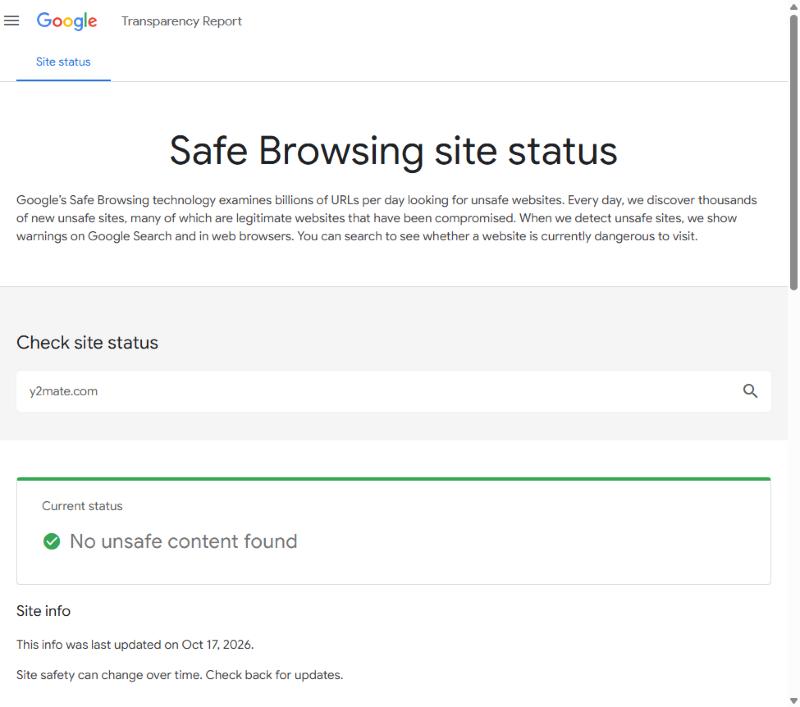
A clean Safe Browsing result means Google is not currently seeing malware or phishing on that domain. It does not check the ad networks a site loads, and it says nothing about the dozens of copycat domains.
Why "Y2Mate virus" keeps coming up
Most bad experiences with Y2Mate are not a virus hidden in the MP4 or MP3 file. A video file downloaded from a converter is very rarely the problem. The problems come from four places:
- Pop-ups and new tabs. Clicking Convert or Download can open an ad in a new tab. Some of those tabs show fake "your phone is infected" warnings.
- Notification prompts. The site, or a page it sends you to, asks to "show notifications". If you click Allow, you get spam alerts on your desktop or phone long after you leave.
- Fake download buttons. Big green buttons in ads that look like the real button. These can lead to app installers or browser extensions you never wanted.
- Copycat domains. There is no single official Y2Mate. You will find y2mate.com, .nu, .is, .guru, .gs, "wvw-" and "v23." versions and more. Each one runs its own ads, so a clean scan of one says little about another.
So is Y2Mate a safe website? It is safer than its reputation if you never allow notifications, never install anything it offers, and close any tab it opens. It is risky for anyone who clicks quickly, uses an old browser, or hands the phone to a child.
How to tell a risky downloader in 10 seconds
| What you see | What it means | What to do |
|---|---|---|
| "Allow notifications" pop-up | The site wants to send you ads later | Click Block, never Allow |
| A new tab opens when you click Download | An ad network took over the click | Close the tab and go back |
| "Your phone has a virus" warning | A scare ad, not a real scan | Close it; do not install anything |
| Asks you to install an app or extension | Not needed to download a video | Leave the site |
| The file ends in .exe, .apk or .dmg | It is a program, not a video | Delete it, do not open it |
| The file is MP4, WebM or MP3 | A normal media file | Fine to open |
Already clicked "Allow"? How to undo it
If you allowed notifications from a Y2Mate page, turn them off. It takes a minute:
- Chrome on a computer: Settings → Privacy and security → Site settings → Notifications. Find the site and remove it. Google explains it in its Chrome notifications help.
- Chrome on Android: Settings → Site settings → Notifications, then block the site.
- Safari on iPhone: web notifications only work for sites added to the Home Screen. Remove the icon if you added one.
If you installed an app or extension that a Y2Mate page offered, uninstall it and run the scan built into your system (Windows Security or your phone's built-in protection).
Is Y2Mate legal?
Using a converter is not a crime in most places by itself, but YouTube's Terms of Service do not allow downloading unless YouTube shows a download button or the owner gives permission. What you download matters most. Your own videos, Creative Commons videos and videos the creator lets you reuse are fine. Re-uploading someone else's video is not.
Safer Y2Mate alternatives, compared
If you are looking for a Y2Mate alternative or sites like Y2Mate without the ad mess, these are the options we would actually point a friend to. The table is the quick version; the cards below have the details.
| Tool | Price | Ads and pop-ups | Limits | Best for |
|---|---|---|---|---|
| Tube Snip | Free: 20 downloads an hour | No pop-ups or redirects | 20 downloads an hour on free use | One video, any device |
| yt-dlp | Free, open source | None | None of its own; YouTube may slow you down | Power users, whole channels |
| 4K Video Downloader Plus | Free Starter; paid from €18.75 a year | Free version: yes (ad-free is paid) | Free: daily download cap | Big queues on a computer |
| YouTube Premium | Paid monthly plan | None | Videos stay inside the YouTube app | Offline viewing only |
| Y2Mate | Free | Yes: ad tabs and notification prompts | Depends on which copy you use | You already use it and can dodge the ads |
Tube Snip
Best for: One video, any deviceOur own tool, so weigh that. Paste a link, see the file size and the video’s license, then save MP4 or MP3.
- Price
- Free: 20 downloads an hour
- Ads and pop-ups
- No pop-ups or redirects
- Limits
- 20 downloads an hour on free use
- Safety
- Runs in the browser; nothing to install
- Shows file size and license before you download
- MP4 up to 4K with sound; MP3 up to 320 kbps
- Works on iPhone, Android and computers
- Hourly limit on free use
- A web tool: no background queue for whole channels
yt-dlp
Best for: Power users, whole channels- Price
- Free, open source
- Ads and pop-ups
- None
- Limits
- None of its own; YouTube may slow you down
- Safety
- Get it only from its GitHub page
- Free and open source
- Works with thousands of sites
- Updated very often
- Command line only
- Needs ffmpeg for the best quality
- YouTube’s bot checks can block it
4K Video Downloader Plus
Best for: Big queues on a computer- Price
- Free Starter; paid from €18.75 a year
- Ads and pop-ups
- Free version: yes (ad-free is paid)
- Limits
- Free: daily download cap
- Safety
- Download only from 4kdownload.com
- Desktop app for Windows and Mac
- Playlists, channels and subtitles
- One-time license option
- Needs an install
- Free plan has a daily cap
- Some features ask you to sign in to YouTube
YouTube Premium
Best for: Offline viewing only- Price
- Paid monthly plan
- Ads and pop-ups
- None
- Limits
- Videos stay inside the YouTube app
- Safety
- Official
- Official and allowed by YouTube
- No ads on YouTube
- No MP4 file you can keep or edit
- Downloads expire if you stay offline too long
Y2Mate
Best for: You already use it and can dodge the ads- Price
- Free
- Ads and pop-ups
- Yes: ad tabs and notification prompts
- Limits
- Depends on which copy you use
- Safety
- Domain not flagged in Safe Browsing (Oct 17, 2026)
- Free, no account
- Simple paste-and-convert page
- Ad tabs and fake download buttons
- Many copycat domains
Which one should you choose?
- You just want one video, fast, on any device: a web tool without ads. Nothing to install and nothing to undo later.
- You download a lot, every week: a desktop app or yt-dlp. They handle long playlists better than any website.
- You only watch offline on a plane: YouTube Premium is the official route, but the video stays inside the app.
- You want to keep using Y2Mate: use an ad blocker, block notifications, and only ever accept MP4, WebM or MP3 files.
For a single video, the YouTube video downloader shows the file size and the video's license before you save anything. For saving a whole lecture series, a playlist downloader saves you dozens of copy-and-paste rounds. For music or podcasts, the YouTube to MP3 converter gives you a real MP3 at 128 to 320 kbps. And on a phone, our iPhone guide shows every tap.
Last checked October 17, 2026. Site safety changes over time, so check a site again in Google's Safe Browsing tool before you use it.
Questions
Is Y2Mate safe in 2026?
The y2mate.com domain was not flagged by Google Safe Browsing on October 17, 2026. The risk is its ads, notification prompts, fake buttons and copycat domains, not the video files themselves.
Does Y2Mate have a virus?
The MP4 or MP3 file is rarely the problem. Trouble comes from ads that open new tabs, fake "virus found" warnings and installers offered by those ads. Never install anything a downloader offers.
Is Y2Mate safe on iPhone?
iPhones cannot run the .exe or .apk files some ads push, so the main risks are scam pages and notification spam. Close extra tabs and tap Block on any notification prompt.
Is Y2Mate legal?
YouTube's terms only allow downloads where YouTube shows a download option or the owner agrees. Your own videos and Creative Commons videos are fine; re-uploading someone else's video is not.
What is a safe alternative to Y2Mate?
A downloader with no pop-ups or redirects, like a clean web tool, yt-dlp on a computer, or YouTube Premium if you only want to watch offline.