Is 4K Video Downloader Safe? Free vs Paid vs yt-dlp
Is 4K Video Downloader safe? Yes from the official site. The real risks, what free and paid plans include, and how it compares with yt-dlp and web tools.
 Simone MatthewContent & video creator at Tube Snip· · 5 min read
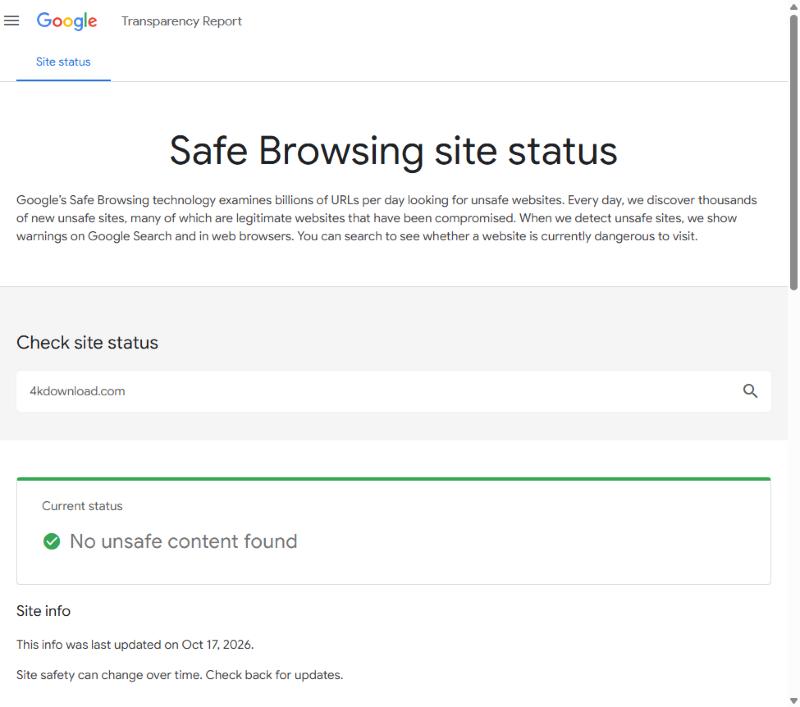
Is 4K Video Downloader safe? Yes, if you get it from the official site, 4kdownload.com. It is a long-running desktop app from a real company, and Google's Safe Browsing tool showed "No unsafe content found" for its site when we checked on October 17, 2026. The real risks are fake copies, "cracked" Pro versions and signing in to YouTube inside a third-party app. This page covers those, what the free and paid plans really include, and how it compares with yt-dlp and web downloaders.
What we checked
For this comparison we looked at the official site and price page on October 17, 2026, checked the domain in Google's Safe Browsing tool, and read the project pages of the other tools. We did not install 4K Video Downloader for this article, so we do not report download speeds for it. Everything below comes from the vendor's own pages or a source we link.
Is 4K Video Downloader Plus safe? The real risks
The app itself is not the danger. These are:
- Fake download sites. Search ads and copycat pages offer "4K Video Downloader free full version". Only download from 4kdownload.com.
- Cracked Pro versions. A cracked installer is the most common way people end up with malware from a "safe" app. A cracked license also stops working when the app updates.
- Signing in to YouTube. Some features, like private videos and in-app subscriptions, need you to log in to YouTube inside the app. Public videos do not need it. Do not sign in with a Google account you care about unless you trust the app fully.
- Old versions. YouTube changes often. An old version may fail or behave oddly. Update from inside the app or from the official site.
So is the 4K Video Downloader app safe on Mac and Windows? Downloaded from the official site and kept up to date, it is about as safe as any desktop app.
4K Video Downloader free vs paid
The free "Starter" plan is real, with no trial period and no card needed. It has a daily download cap that the price page does not spell out. Older posts on 4K Download's own blog give different numbers over the years, so check the app for today's limit.
Here are the paid plans as shown to us in euros (prices differ by country):
| Plan | Price | Devices | Notes |
|---|---|---|---|
| Starter | Free | — | Daily download cap; ad-free is a paid feature |
| Lite | €18.75 a year | 1 | Main features, subscription |
| Personal | €31.25 one time | 3 | Main features, lifetime |
| Pro | €50 one time (was €66.66) | 3 | All features, commercial use, up to 7 downloads at once |
Ad-free use is listed as a paid feature, which tells you the free version shows ads. On its own site the app has a 4.6 rating from 3,572 reviews. In one of those reviews, a user mentions trouble signing in to YouTube.
4K Video Downloader vs yt-dlp vs web tools
| Tool | Price | Ads and pop-ups | Limits | Best for |
|---|---|---|---|---|
| 4K Video Downloader Plus | Free Starter; paid from €18.75 a year | Free version: yes (ad-free is paid) | Free: daily download cap | Big queues on a computer |
| yt-dlp | Free, open source | None | None of its own; YouTube may slow you down | Power users, whole channels |
| Tube Snip | Free: 20 downloads an hour | No pop-ups or redirects | 20 downloads an hour on free use | One video, any device |
| YouTube Premium | Paid monthly plan | None | Videos stay inside the YouTube app | Offline viewing only |
4K Video Downloader Plus
Best for: Big queues on a computer- Price
- Free Starter; paid from €18.75 a year
- Ads and pop-ups
- Free version: yes (ad-free is paid)
- Limits
- Free: daily download cap
- Safety
- Download only from 4kdownload.com
- Desktop app for Windows and Mac
- Playlists, channels and subtitles
- One-time license option
- Needs an install
- Free plan has a daily cap
- Some features ask you to sign in to YouTube
yt-dlp
Best for: Power users, whole channels- Price
- Free, open source
- Ads and pop-ups
- None
- Limits
- None of its own; YouTube may slow you down
- Safety
- Get it only from its GitHub page
- Free and open source
- Works with thousands of sites
- Updated very often
- Command line only
- Needs ffmpeg for the best quality
- YouTube’s bot checks can block it
Tube Snip
Best for: One video, any deviceOur own tool, so weigh that. Paste a link, see the file size and the video’s license, then save MP4 or MP3.
- Price
- Free: 20 downloads an hour
- Ads and pop-ups
- No pop-ups or redirects
- Limits
- 20 downloads an hour on free use
- Safety
- Runs in the browser; nothing to install
- Shows file size and license before you download
- MP4 up to 4K with sound; MP3 up to 320 kbps
- Works on iPhone, Android and computers
- Hourly limit on free use
- A web tool: no background queue for whole channels
YouTube Premium
Best for: Offline viewing only- Price
- Paid monthly plan
- Ads and pop-ups
- None
- Limits
- Videos stay inside the YouTube app
- Safety
- Official
- Official and allowed by YouTube
- No ads on YouTube
- No MP4 file you can keep or edit
- Downloads expire if you stay offline too long
4K Video Downloader vs yt-dlp
These two come up together because they solve the same problem in very different ways.
- Ease: 4K Video Downloader Plus has a window, buttons and a queue you can watch. yt-dlp runs in a terminal; you type a command such as
yt-dlp -f "bv*+ba" <link>. - Cost: yt-dlp is free and open source, with no daily cap of its own. 4K's free Starter plan has a daily cap; unlimited use is paid.
- Updates: yt-dlp ships fixes very often when YouTube changes something. Desktop apps update on their own schedule, so check that yours is current.
- Trust: both are safe from their official homes. For yt-dlp that is its GitHub page; for 4K it is 4kdownload.com.
- Extras: yt-dlp needs ffmpeg installed to merge the best video and audio. 4K bundles everything.
If you are not comfortable with a command line, yt-dlp is not for you, and that is fine. If you are, it is the most flexible free option there is.
Which one should you choose?
| You want | Pick | Why |
|---|---|---|
| Hundreds of videos, whole channels | 4K Video Downloader Plus (paid) or yt-dlp | Queues, playlists, subscriptions |
| Free, open source, no limits | yt-dlp | Command line, updated very often |
| One video now, on any device | A web tool | Nothing to install, works on a phone |
| Offline viewing only | YouTube Premium | Official, stays in the YouTube app |
If you only grab a few videos a week, paying for a desktop app is hard to justify. If you archive whole channels, a paid desktop license or yt-dlp will save you hours.
Is it legal?
Downloading is about what you save, not which app you use. YouTube's Terms of Service only allow downloads where YouTube offers a button or the owner agrees. Your own uploads, Creative Commons videos and videos the creator lets you reuse are fine. The Pro plan's "commercial use" covers the software license, not the rights to other people's videos.
A web alternative to 4K Video Downloader
If you want the 4K app's main job without installing anything, the YouTube video downloader does single videos up to 4K with the sound included, and shows the file size before you download. Need many videos? The playlist downloader lists the whole playlist. For audio, use YouTube to MP3, and for subtitles, the subtitle downloader.
Troubleshooting
| What you see | Why | Fix |
|---|---|---|
| Antivirus warns about the installer | You may have a fake or cracked copy | Delete it and download from 4kdownload.com |
| "Daily limit reached" | Free Starter cap | Wait a day, upgrade, or use another tool |
| The app asks you to sign in to YouTube | Needed only for private content | Skip it for public videos |
| Downloads fail after a YouTube change | Old app version | Update the app |
| yt-dlp says "Sign in to confirm you're not a bot" | YouTube flagged your network | Update yt-dlp and try later |
Last checked October 17, 2026. Prices and limits change; the vendor's site has the current ones.
Questions
Is 4K Video Downloader safe in 2026?
Yes, when downloaded from 4kdownload.com. Google Safe Browsing showed no unsafe content for the site on October 17, 2026. Avoid cracked or "free full version" copies from other sites.
Is 4K Video Downloader free?
There is a free Starter plan with a daily download cap. Paid plans start at €18.75 a year, or €31.25 one time for Personal (prices shown to us in euros).
Is 4K Video Downloader Plus safe on Mac?
The official Mac version from 4kdownload.com is a normal desktop app. Keep it updated and only sign in to YouTube inside it if you need private content.
Is 4K Video Downloader better than yt-dlp?
4K is easier, with a window and buttons. yt-dlp is free, open source and updated more often, but it runs on the command line.
What is a good 4K Video Downloader alternative?
yt-dlp for power users, a web downloader for single videos on any device, or YouTube Premium if you only want offline viewing.